Troubleshooting
Common Issues
My recipients have phone numbers but the app says that they are missing phone numbers
Solution:
Phone number formats are very strict in this add-on. Read here for more information
Recipient or Sendout status doesn't change
The SMS gets sent and SMS-sendout gets created in Lime, but the recipient status doesn't change from Initialized.
Solution:
Make sure you have restarted all Lime services and that they are up and running, especially Lime task service, and try again. Make sure that the integration settings in Lime Marketing is pointing to the right url and has the correct api key. Otherwise check the logs for any errors (both webserver and taskhandler).
For a status-by-status breakdown of likely causes, see Understanding recipient & sendout statuses below.
It takes a long time to send SMS messages
The SMS is stuck in Initialized or Sending status
Solution:
If you have a very large sendout it can take up to 30 minutes before all recipients have been added to the sendout and the task handler has sent the request to Lime Marketing. If the sendout is slow for smaller sendouts make sure that the task handler is not busy running other tasks.
The application displays an error after clicking send when running the app from a non-admin account
The application displays an error after clicking send and in the task-handler log file shows lime_query.Unauthorized() in the stack trace. But it works if you run the app from an admin account
Solution:
Check if the solution is using record-access for any limetypes mentioned in the addon config. If that is the case you need to disable record access, otherwise the addon won't work. Read more here
Understanding recipient & sendout statuses
This section explains what the statuses mean and how to read a sendout or recipient that seems stuck. For the full lifecycle see Technical.
Does Sent or Delivered guarantee the SMS arrived?
Delivered means the recipient's device confirmed delivery (when the operator reports it). Sent only means the message left Lime Marketing towards the network — it is not a delivery guarantee.
Important: Lime Marketing only sends success webhooks (sent, delivered) — there are no failure webhooks. So a message that genuinely failed at the operator will stay in Queued or Sent indefinitely.
Why is my sendout stuck in Created?
Cause: The sendout and the Lime Marketing message were created, but the background task that builds the recipients never ran or failed immediately — usually because the Lime task handler isn't running, or the addon configuration is missing.
Solution:
Make sure the Lime task service is running and isn't busy with other tasks. Check the task handler and web server logs for errors (e.g. a missing/invalid addon config), fix the cause, and send again.
Why is my sendout stuck in Initialized?
Cause: The background task created the recipients and handed the list to Lime Marketing, but either the task failed at the hand-off/send step, or sending started in Lime Marketing and the send_started webhook never reached the addon. Note that the addon never sets a sendout to Failed automatically, so a failed task leaves it in Initialized.
Solution:
Check the task handler log to confirm whether the task completed. If it did, verify the integration settings in in Lime Marketing points to the correct URL and API key. Check the web server log for incoming webhook errors.
Why is my sendout stuck in Sending?
Cause: Lime Marketing started sending (the send_started webhook arrived) but the send_finished webhook hasn't arrived yet. For large sendouts this can be normal for a while.
Solution:
Give large sendouts time — see It takes a long time to send SMS messages. If it never finishes, check the web server log for webhook errors.
Why is a recipient stuck in Queued?
Cause: The phone number was accepted by Lime Marketing, but the addon never received a sent webhook for it. This happens if the send step failed, if the integration settings in Lime Marketing is misconfigured, or if the message genuinely failed at the operator (remember: no failure webhook is ever sent).
Solution:
Verify the URL and API key lime marketing, and check the web server log for incoming webhook errors. If the rest of the sendout did receive sent/delivered webhooks, this recipient most likely failed at the operator.
Why is a recipient stuck in Sent and never reaches Delivered?
Cause: A sent webhook only means the message reached Lime Marketing's SMS service — not that it reached the phone. No delivered webhook arrived because either the operator doesn't return delivery receipts, or the message was dropped downstream. In particular, sender-ID/country filtering (for example an unregistered sender ID for a country that requires registration, such as Finland) can drop a message after the sent webhook has fired. When that happens the recipient shows as blocked in Lime Marketing, even though Lime CRM still shows Sent. Because no non-delivery report is sent back, Lime CRM can't tell these cases apart from the status alone.
Solution:
Check the recipient's status in Lime Marketing — a blocked status there confirms the send was stopped by sender-ID/country filtering. If you send to regulated countries, make sure the sender ID is registered/approved for those destinations in Lime Marketing.
Why is a recipient marked Failed?
Cause: During import to Lime Marketing the phone number was invalid (wrong format) or didn't match anything in the imported list, so it was never sent to. This status is terminal — no webhook will change it.
Solution:
Phone number formats are very strict in this add-on. Check the recipient's phone number format and read here for how to format numbers correctly, then create a new sendout for the affected recipients.
A sender is greyed out or missing from the sender list
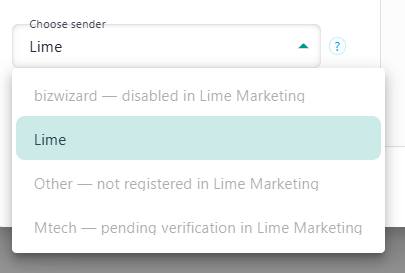
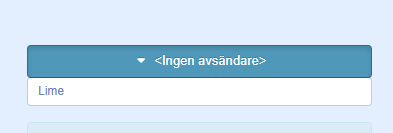
Configured senders are validated against Lime Marketing before they can be selected. A sender that is not valid in Lime Marketing is not selectable:
- In the web client it is shown greyed out with the reason appended to its name, for example
Lime — pending verification in Lime Marketing. - In the desktop client it is hidden from the list entirely.
The reasons a sender is not valid are:
- not registered in Lime Marketing - the sender name is not registered as a sender id in Lime Marketing.
- pending verification in Lime Marketing - the sender id exists but has not been verified yet.
- disabled in Lime Marketing - the sender id is verified but disabled.
- could not be verified with Lime Marketing - Lime CRM could not reach Lime Marketing to validate the sender.
Solution:
Register, verify and enable the sender id in Lime Marketing (see Sender IDs in Lime Marketing), and make sure the sender name in the addon config matches the Lime Marketing sender id (matching is case-insensitive). If senders are listed as could not be verified, check the Lime Marketing connection and that the application config is valid.